 If you are addicted to plugins or just curious as I am, you probably know we spend way to much time trying many different pieces of software that do the same thing, more or less. Compression, saturation, equalization…The list goes on.
It’s no lie to say there are literally dozens of different vintage compressors or boutique equalizers emulations out there and, every time a new one drops, I try to resist the urge to give it a test drive…most of the times with no luck.
Are you on the same boat?
Well, in this post I want to tell you something about a plugin that really does something different: The “Perception” Plugin.
I was first introduced to this plugin by my friend and mentor, the mastering engineer Ian Shepherd over at ProductionAdvice.
The plugin has been developed by Ian himself with the collaboration of MeterPlugs.
The result is a mastering tool that is really useful and unique.
For what I know, this is a one-of-a-kind plugin.
I could be wrong, but I am not aware of other commercial plugins doing a similar thing.
Is Louder Really Better?
Human ear and brain tend to perceive louder things as better if compared to a softer version.
It’s very easy to fool somebody with this trick: try playing the same identical track two different times at different volumes to one of your friends…
He will perceive more bass and shine in the louder version and this will most likely lead him to the conclusion that the louder version is actually “better”.
This things extends to engineers as well!
You put your latest equalizer on the track you are mastering and “boom”! Suddenly everything sounds louder, fuller and, again, (seems) “better”.
Have you ever experienced that?
But is it really true or you’ve just been fooled by loudness again? You need lots of training to make a good judgment. That’s when Perception comes into play.
The Magic Of Perception
Using a level-matching algorithm and some more nerdy things, Perception will calculate and “bypass” the volume changes and let you hear the two tracks you’re comparing at the same exact level, while keeping the sonic changes you made with the things you put on the processed one.
This way you’ll only hear what you’re really adding to the processed track sonically wise; the good, the bad and the ugly, with no level changes!
Making accurate decisions about what you’re hearing is only possible if the stuff you’re comparing is playing at the same level. This is important during mixing and crucial during mastering.
Veteran mastering engineers spend years learning how to level match and, after that, it takes time at every single round! This plugin will speed up your work.
Using Perception, you won’t need to manually adjust the levels between the 2 tracks and do back and forth with them anymore. It will automatically determine “how loud” your tracks are and perfectly match them. You can then easily A/B the 2 versions and hear exactly what’s going on without being fooled by level changes, being able to judge with accuracy if the processed track is really better than the unprocessed, original one.
This is especially useful on long lasting sessions or when you (and your ears) are tired. With Perception you can feel confident and be sure to hear a real, level matched comparison.
It’s Way More Than Just A Level Matching Thing
Yes, this plugin features some other really useful functions as well.
To me, the most important is the possibility to change the gain you’re giving to the processing track. You can push your processed song harder against the limiter or whatever comes next, and hear how it sounds. Does it sound distorted? Maybe a bit too much “squashed”? Or perhaps you can lift it a bit more?
Perception will let you do all of this; and again, everything can be level matched at your wish by just pressing a button.
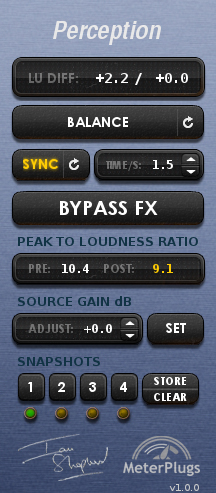
When you’re working, a very handy “peak to loudness ratio” indicator gives you a “pre” and “post” processing value of the loudness of your song, measured in LU (Loudness Units).
As you may have guessed, it will give you a good indication on how much you are “squashing” your source.
Sometimes having some kind of visual feedback may be useful to keep you on track. For instance, if the “post” meter hits a value below 8LU, I know I need to think about it twice to avoid too much compression or limiting that can do more harm than good to the song! I use it every time.
Last but not least, there is the “snapshots” feature. It basically lets you save up to 4 different scenes of Perception, and jump from one to another with just a click, so you can hear which one of your presets works best for the song you’re working on.
Finally Answer The Question: “How Loud? “
Hearing things at the same levels will also let you determine the best level, the “sweet spot” for the loudness of your track, helping you answer the question: “How loud should I go with this song?”.
By doing fair comparisons, you’ll be able to spot when a song starts to sound “squeezed” and “lifeless” due to too much processing, so you can back off the volume a bit before it’s too late in the process! Super cool right?
I know, this plugin doesn’t feature fancy knobs or something “cool”, but trust me, it will really make your work better, and a great sounding song is all that matters in the end.
You can get Perception here.
Are you going to try it? Leave a comment and share your thoughts.