Recording64Recording64
  • Blog
  • Free eBook
  • Articles
    • All Posts
    • Tips
    • Recording
    • Mixing
    • Mastering
    • Plugins
    • Reviews
    • Pro Tools Diary
  • About

Pro Tools Diary | Essential Key Commands

Posted in: Pro Tools, Pro Tools Diary, Tips||Tags: essential key commands, keyboard, pro tools, pro tools diary, shortcuts, tips

Pro Tools is a very powerful DAW, but it can be even more powerful if you get used to some keyboard shortcuts… Why? Because every operation you can do by using just your mouse, you can do much faster using a shortcut!

There are tons of different key commands, but you don’t need to know them all to boost the speed of your workflow by 10x.
Here’s my personal selection of the essential ones I use day in day out.

Keyboard Overview

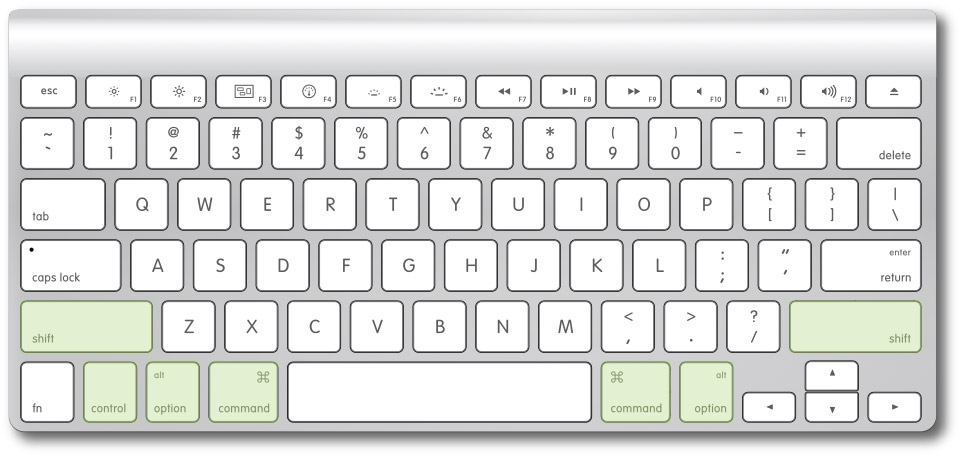
All of the commands I’m going to show you make use of the Control, Option, Command and Shift keys.
If you don’t know where they are, just look at the image below.
(If you are on a Mac, your keyboard should look similar to this one).

Note:
These key commands are for Mac OS X!
If you’re on a Windows machine, be aware you should replace:
Opt = Alt
Cmd = Ctrl
Shortcuts Best Of

Toggle Between Mix/Edit Window: Cmd+Shift+0
(Super useful if you work on a single screen!)

Create New Track: Cmd+Shift+N
Duplicate Track: Opt+Shift+D
Shift+Option+Click to make changes to the selected tracks only
(For instance, if you want to mute a selection of tracks…)

Horizontal Zoom (+): T
Horizontal Zoom (-): R

Enable/Disable Insert Or Send: Cmd+Ctrl+Click
Toggle Bypass On All Inserts/Sends In A Row: Opt+Cmd+Click

Create New Group (with relative tracks selected): Cmd+G
Enable/Disable All Groups: Cmd+Shift+G
(With the mouse cursor on one or more tracks)

Mute: Shift+M
Solo: Shift+S
Record: Shift+R
(With one or more regions selected)

Duplicate Region: Cmd+D
Repeat Region: Cmd+R
Consolidate Regions (Conform): Opt+Shift+3

Now You Have The Turbo!

Here it is, pretty simple!
Now you can choose if you want to keep using the DAW with just your mouse, basically walking with two blocks made of concrete hooked to your feet, or use the turbo you got and start running! Have fun!

By the way…these were the shortcuts I personally use most, but you may have some different killer ones. 
Share some of them with a comment… Can’t wait to check them out!
You May Also Like

  • Pro Tools Diary | Quick Access Your Favorite PluginsPro Tools Diary | Quick Access Your Favorite Plugins
  • Pro Tools Diary | Set Your Default PluginsPro Tools Diary | Set Your Default Plugins
  • Pro Tools Diary | Default Opening Preset For A PluginPro Tools Diary | Default Opening Preset For A Plugin
  • Pro Tools Diary | Backup Your SessionPro Tools Diary | Backup Your Session
  • Pro Tools Diary | Plugin A/B Compare FunctionPro Tools Diary | Plugin A/B Compare Function
Feb 2, 2021 Fab
← Mastering In Your Home Studio? You Can Do It!
There Is No Magic Bullet →

2 Responses to Pro Tools Diary | Essential Key Commands

  • Ed Oct 12, 2014

    Good stuff. Saved to my bookmarks!

    Reply
    • Fab Oct 14, 2014

      Thanks for reading! Glad it helped 😉

      Reply

Leave a Reply Cancel reply

Your email address will not be published. Required fields are marked *

This site uses Akismet to reduce spam. Learn how your comment data is processed.

Popular Posts

  • Can You Record Pro Sounding Vocals With A SM58 Microphone? [Reader’s Question]
  • Auralex Mopads Studio Monitor Isolators Review
  • Mastering In Studio One 2 – Part 2
  • Pro Tools Diary | Open A Session With Plugins Inactive
  • Pro Tools Diary | Backup Your Session

Search Something

Connect

Connect FacebookConnect RSSConnect Twitter

About Fab

....

Hi! My name is Fab Sanfilippo and I am an Italian mixer, producer, guitar player and author of all the typos around here. My passion for recording, music and technology in general pushed me to start Recording64, to share my musical journey and help people get better music out of their home studios.

Until now, the blog reached readers in more than 50 countries worldwide. To learn more, head over to the About Page.

Follow @recording64
  • Blog
  • Subscribe
  • About
  • Contact
  • Sitemap
Site Design and Development by Fab Sanfilippo
All images are exclusive property of their respective owners
Copyright © 2018 Recording64 | Privacy | Disclosures
This website uses cookies to improve your experience. We'll assume you're ok with this, but you can opt-out if you wish.Got It! Read Full Policy
Privacy & Cookies Policy

Privacy Overview

This website uses cookies to improve your experience while you navigate through the website. Out of these, the cookies that are categorized as necessary are stored on your browser as they are essential for the working of basic functionalities of the website. We also use third-party cookies that help us analyze and understand how you use this website. These cookies will be stored in your browser only with your consent. You also have the option to opt-out of these cookies. But opting out of some of these cookies may affect your browsing experience.
Necessary
Always Enabled
Necessary cookies are absolutely essential for the website to function properly. This category only includes cookies that ensures basic functionalities and security features of the website. These cookies do not store any personal information.
Non-necessary
Any cookies that may not be particularly necessary for the website to function and is used specifically to collect user personal data via analytics, ads, other embedded contents are termed as non-necessary cookies. It is mandatory to procure user consent prior to running these cookies on your website.
SAVE & ACCEPT