 Room acoustics are a curse for every single engineer. Your space may dramatically influence what’s coming out of your speakers, no matter how much you paid them. Having a super set of speaker won’t help that much if your room sounds bad, and if you can’t accurately hear what’s going on, you’ll have some hard times making your mixes to translate on other playback devices.
There is no shortcut: you need to consider your room acoustics and maybe plan to spend some money on acoustic panels. At least, that’s what you’ve been reading since now…
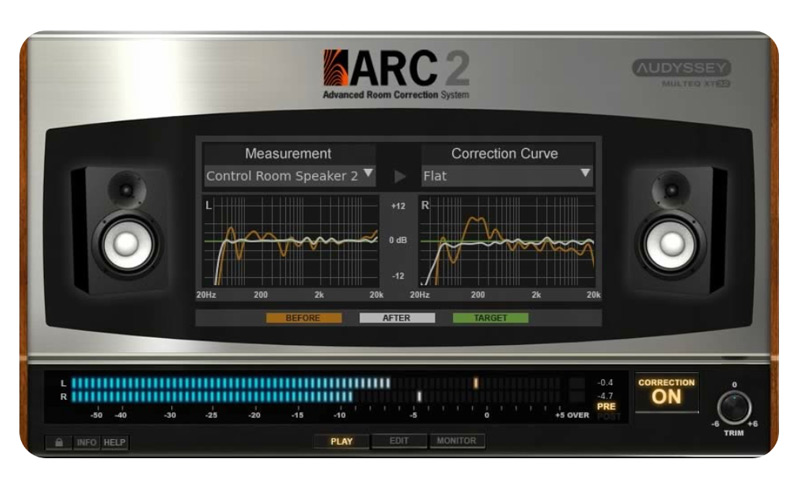
Today I want to introduce you the ARC 2 Room Correction system by IK Multimedia, a plugin that aims to completely fix your room acoustics in just a few easy steps! Crazy huge deal, right?
But does it really work? Will it replace the need for acoustic treatments? Here it is.
Just A Room Correction EQ?
You may have heard something about using EQ for room correction purposes…
I did, but I’ve always been really skeptical about that.
The acoustic in a closed spaced is a really complicate subject and can’t be addressed with some simple EQ curves…Using an EQ for that may even do more harm than good to your music (and equipment), indeed.
In the beginning, I thought the ARC 2 was nothing more than having a graphic equalizer right before your speakers but then I discovered there was much more under the hood.
IK Multimedia worked together with Audyssey EQ Labs (known in the Hi-Fi world for room correction software solutions) and adopted their technology in the ARC 2, with an algorithm that works both in the frequency/time domains and claims to be pretty transparent.
That intrigued me a lot and so I decided to go against my prejudices and give it a try.
How Does It Work?
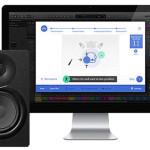
The ARC 2 system comes as a plugin for your DAW (VST, AU, RTAS and AAX compatible) and you just have to insert it on your master bus, last in the chain, so it can process everything right before you hear it. But before you can do that, you’ll need to follow a simple procedure that will gather all the “acoustic informations” about your room into the software, so it can do what it’s meant to do.
With the package you’ll get a calibrated condenser microphone that you setup in strategic positions within your space (you’ll find all the details in the manual); then the software will fire some fast sweep impulses and listen to what those tones are sounding in your room.
Now it can apply all the corrections, delivering you a flat-sounding and in-phase EQ correction preset.
The goal? By hearing everything flat, you can now make fair decisions about what you’re hearing and work better, because all the issues of your room have been fixed! No more guessing, less frustration, less wasted time and better mixes that will translate well.
Then, once your mix is done, just remove it from its insert slot, bounce your mix and voilà!
Note: You can use the ARC 2 while recording as well, monitoring what you’re getting from your microphones with accuracy.
My Experience With The ARC 2
Now that we know a bit more about what’s behind the ARC 2, let me tell you about my experience with it.
First, I have my monitors carefully positioned and my room is acoustically treated with a good amount of thick bass traps and absorbers. Those panels eliminated all the slap-back ringing, evened out the bass response and gave me a good dry and tight sounding space.
Even if I still had problems with some frequencies (“room modes” anyone?), I was fairly happy with the sound I was getting.
So, for the very first test, I loaded up a session and had a listen…
The overall bass was pretty weak and there was some mud in the low-mid frequencies. And that’s exactly what I was expecting, as I know my room has a null around 70Hz and a dip around 150-200Hz, so I was prepared for that…
Then I slapped the ARC on the master channel and tried with it engaged…
“There must be something wrong…”. That’s exactly what I thought that day.
Everything was sounding so cleaner, focused and overall better than the way I was used to that I couldn’t believe that. All the issues above were completely gone! Literally amazing.
The bass got deeper and fuller, but without overwhelming the rest of the mix. The ARC cleaned out the low-mids dirt and all of a sudden everything was sounding less muffled and punchier, with a new 3D depth from lows to highs and with an improved stereo image as well. All of this in a really transparent way.
With the ARC engaged, I noticed most of the tracks were sounding just good; there was no need to EQ them that much. I’ve been able to mix the song quickly and I was really happy when I heard it was it was translating pretty well outside my studio, at first round, with no need of further tweaking.
Without the ARC, I would have been forced to EQ everything, trying to fix it somehow, just to discover there were no real issues going on and making the mix worse actually, while that was just my room cheating me!
After testing the ARC with some more music, it’s fair to say I discovered a whole new dimension even on my favorite songs. I think I felt kinda like Neo when Morpheus tells him about that “real world”. It opened my eyes. I was just impressed and happy at the same time.
Can The ARC 2 Replace Proper Acoustic Treatment?
Here’s the bitter part of this review…Maybe you’re thinking this ARC can address all of the acoustic issues of your room by itself…I think the answer is no, it can’t.
It can help untreated rooms, but it will work best with an optimal speaker placement and maybe some acoustic treatments. I think these 2 steps are the most part of what good (or bad) you’ll get from your room, and you should not skip them, at all!
On top of that, the software processes the music leaving your DAW to correct what you’ll hear in your room. This means that, even if the algorithm is transparent, the more it will have to work, the more it will impact (and harm) your sound.
I’d rather make it work as less as I can by starting the smart way with the 2 big wins above (some acoustic treatments and good speakers placement) first and THEN use the ARC for fine tuning. The less it will have to work, the better!
Some Final Thoughts
Now you know everything you should need to know to make an educated choice about the ARC 2.
Just remember this is just a tool: it will make your life easier and you will work faster, but this is not the definitive trick that will instantly make a better mixer out of you. As told in a previous article, there are no magic bullets, you need to learn it the hard way.
Said that, I’ve been using the ARC 2 for the last 8-10 months now, and I’m still impressed about it. It just made a noticeable difference to me and it works, by no means. I don’t need to know the alchemy behind it, it just sounds good. Furthermore, it comes with a really handy feature that lets your simulate other kind of speakers and listening environments, so you can have other perspectives without leaving your studio.
For what it costs (299.99$), to me it is an absolute no brainer.
You won’t likely find anything else that could help you that much with this price tag.
Note: Uh! And remember you’ll even get a very transparent omnidirectional condenser microphone with it that you can use for recording purposes!