 I love hardware toys, twisting knobs, working with microphones and all that stuff, and I love plugins as well, especially if they can bring something different to the table. (You know, there are too many plugins doing roughly the same stuff out there!)
With today’s post I want to introduce you a really cool plugin I came across a while ago that does something different from the crowd.
The tool came with the curious name “BitterSweet v3” and has been developed by Flux, a popular high-end plugin manufacturer. The plugin comes in all the formats you can imagine (AU, VST and yes, AAX as well) in both 32 and 64bit shapes.
And the cool part is that it is absolutely FREE!
Let’s check out what you can do with it and why you should add it to your arsenal!
Transient Shaping?
Transients are the very first milliseconds of an audio signal. It’s a very important portion of the signal, because it give us the attack of an instrument; it’s the life of it!
You may think only drums and percussive instruments have transients…
That’s wrong! Every single instrument has transients, from bass to vocals.
Now that you know what we’re talking about, here comes the fun part.
The BitterSweet is a transient shaper plugin. It let you deal with those transients with much more detail, a bit like having a magnifier lens just on that initial piece of your signal.
You tried everything but still can’t get your kick drum to cut through the mix?
That’s the case where a transient shaper can be handy!
A transient designer like this is a bit different from a classic compressor… It is a dynamic processor that will only work on the transients; the rest of the signal will be left completely untouched.
Note: If you want to get some insights with plain english words on how a compressor works and how to wield it with more confidence, check out this mini series.
Easy To Use
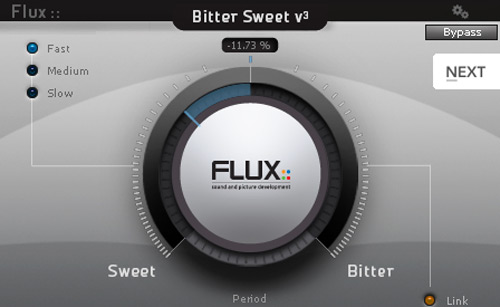
Even if the subject might be a bit complicated, the plugin let you do all the dirty work with extreme ease of use. Just turn the big knob to the “Sweet” side to decrease the amplitude (thus the volume) of your transients, or turn it to the “Bitter” side to increase it and get more impact and punch from your signal.
A few other buttons will let you tweak things like attack and release times and match the overall output level. Everything in a super straightforward (no-waste-of-time) way. Just the way we like it!
Mid/Side Processing
The BitterSweet can even work in Mid/Side configuration. This might be useful if you want to process a stereo instrument, put it on a stereo bus or, why not, on your master channel.
Leave it on the “Center” position and it will process only the mid component of your signal. That’s especially useful for kick, snare, bass and all the stuff that lies in the center of your stereo image.
The “Stereo” setting will tell the plugin to process only the sides of your signal (so your center will be left unprocessed). Might be a good idea to try this setting if you only want to deal with just the transient of a stereo acoustic guitar, for instance.
Lastly, if you set it to “Main”, the plugin will process both the mid and the sides components with a classic stereo behavior.
Get It!
Ok. No more words for today. Just go get it and have some fun!
Will it dramatically change the way your mixes sound? Of course not. It’s not about the tools you have, it’s just about you, but having a new free toy to play with is always a great thing, isn’t it?
So why don’t give it a try?
Here’s the link where you can download the BitterSweet right now…
Leave a comment below and let me know if you liked it!