Recording64Recording64
  • Blog
  • Free eBook
  • Articles
    • All Posts
    • Tips
    • Recording
    • Mixing
    • Mastering
    • Plugins
    • Reviews
    • Pro Tools Diary
  • About

Pro Tools Diary | Plugin A/B Compare Function

Posted in: Pro Tools, Pro Tools Diary, Tips||Tags: plugins, presets, pro tools, pro tools diary

Usually, when you want to A/B a plugin, it’s just a before and after thing, with or without the plugin, right? But what about about a comparison between settings?

You guessed it… There’s a cool function inside Pro Tools that lets you to just that!

It’s allows us to A/B from one setting to another setting at the push of a button! Pretty handy right? Here’s how it works…

Dial In And Save Your Settings

Start by firing up a plugin on one of your free inserts; then mess a bit with the settings until you’re happy or just select a factory preset… Next in line you’ll need to save those current settings as a new preset. 
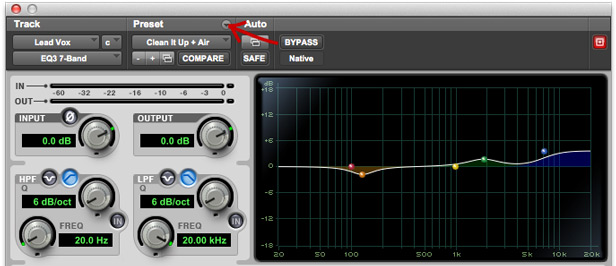
Just in case you don’t know, you can do so by clicking on the tiny downward arrow right above the preset’s dropdown menu or, more quickly, with the keyboard shortcut Cmd+Shift+S (or Ctrl+Shift+S if you’re on a PC).

Note: this won’t be necessary if you picked a preset and haven’t changed it.

The Compare Button

Almost done…Once the settings have been saved, and as soon as you’ll start changing them again, you’ll notice the Compare button will light up blue. And you can now toggle between the settings you saved as a preset before and your new settings by just pressing it!
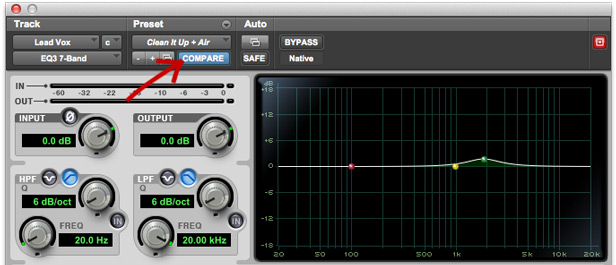
Note: When the Compare button is light blue, you’re looking at your new settings.

Keep What Works Best

So there you have it! Another quick trick to a better mixing workflow!

The Compare function is often underrated by people, but I think it could be really useful for hearing less or more subtle differences going back and forth between 2 different plugin settings in a matter of a click and being sure we’re making the best choices for our song!

–

Make sure to check the other segments of Pro Tools Diary to get the best out of this awesome DAW!
You May Also Like

  • Pro Tools Diary | Default Opening Preset For A PluginPro Tools Diary | Default Opening Preset For A Plugin
  • 3 Simple EQ Curves To Test Your Mix3 Simple EQ Curves To Test Your Mix
  • Pro Tools Diary | Auditioning And Using LoopsPro Tools Diary | Auditioning And Using Loops
  • Pro Tools Diary | Quick Access Your Favorite PluginsPro Tools Diary | Quick Access Your Favorite Plugins
  • Free Metric Halo “Thump” Subharmonic Generator PluginFree Metric Halo “Thump” Subharmonic Generator Plugin
Feb 2, 2021 Fab
← Are You New To Recording64?
Your New Year’s Plans →

Leave a Reply Cancel reply

Your email address will not be published. Required fields are marked *

This site uses Akismet to reduce spam. Learn how your comment data is processed.

Popular Posts

  • 3 Simple EQ Curves To Test Your Mix
  • Auralex Mopads Studio Monitor Isolators Review
  • How Do You Form Your Taste?
    (Or You Are The Music You Listen To)
  • How To Get Ambience, Depth And Height With Reverbs
  • IK Multimedia ARC 2 Room Correction Plugin Review

Search Something

Connect

Connect FacebookConnect RSSConnect Twitter

About Fab

....

Hi! My name is Fab Sanfilippo and I am an Italian mixer, producer, guitar player and author of all the typos around here. My passion for recording, music and technology in general pushed me to start Recording64, to share my musical journey and help people get better music out of their home studios.

Until now, the blog reached readers in more than 50 countries worldwide. To learn more, head over to the About Page.

Follow @recording64
  • Blog
  • Subscribe
  • About
  • Contact
  • Sitemap
Site Design and Development by Fab Sanfilippo
All images are exclusive property of their respective owners
Copyright © 2018 Recording64 | Privacy | Disclosures
This website uses cookies to improve your experience. We'll assume you're ok with this, but you can opt-out if you wish.Got It! Read Full Policy
Privacy & Cookies Policy

Privacy Overview

This website uses cookies to improve your experience while you navigate through the website. Out of these, the cookies that are categorized as necessary are stored on your browser as they are essential for the working of basic functionalities of the website. We also use third-party cookies that help us analyze and understand how you use this website. These cookies will be stored in your browser only with your consent. You also have the option to opt-out of these cookies. But opting out of some of these cookies may affect your browsing experience.
Necessary
Always Enabled
Necessary cookies are absolutely essential for the website to function properly. This category only includes cookies that ensures basic functionalities and security features of the website. These cookies do not store any personal information.
Non-necessary
Any cookies that may not be particularly necessary for the website to function and is used specifically to collect user personal data via analytics, ads, other embedded contents are termed as non-necessary cookies. It is mandatory to procure user consent prior to running these cookies on your website.
SAVE & ACCEPT